A parent wants to know when a child reaches tuition. A branch manager wants to know when a customer is waiting at an empty counter. Both situations need an event at the premises to reach the right person, but they begin with different types of equipment.
EntryLuma connects supported entry readers and compatible cameras to cloud records and configured notifications. WebWMS2U provides the WhatsApp delivery backend. The distinction matters when choosing equipment, defining the event and troubleshooting a missing message.
Entry readers: identify the recorded attendance event
A supported face, fingerprint, card or PIN reader authenticates someone at the entrance. The local Entry connector reads the successful event and submits details to EntryLuma. The cloud matches the device person ID to a configured access user and branch.
For a learning centre, a nominated parent can receive an arrival update. For an office, branch recipients can receive supported staff attendance events. The device and its configuration determine which methods, event types and photos are available.
Explore WhatsApp attendance notifications from entry devices.
CCTV: check a condition in a camera zone
A camera provides images rather than a confirmed reader authentication. The local CCTV connector samples compatible images and evaluates whether people are present in the zones you marked. Its rule also considers the active hours, configured delay and cooldown.
An unattended-counter example combines two conditions: the customer area is occupied while the staff area remains empty. If those conditions persist for the configured period, an alert can be raised for the manager.
This workflow detects presence, not a named employee’s identity. Lighting, camera angle and obstructions affect the result. It should not be presented as CCTV-based staff clock-in or a payroll calculation system.
Explore CCTV WhatsApp alerts and camera-zone rules.
How EntryLuma and WebWMS2U work together
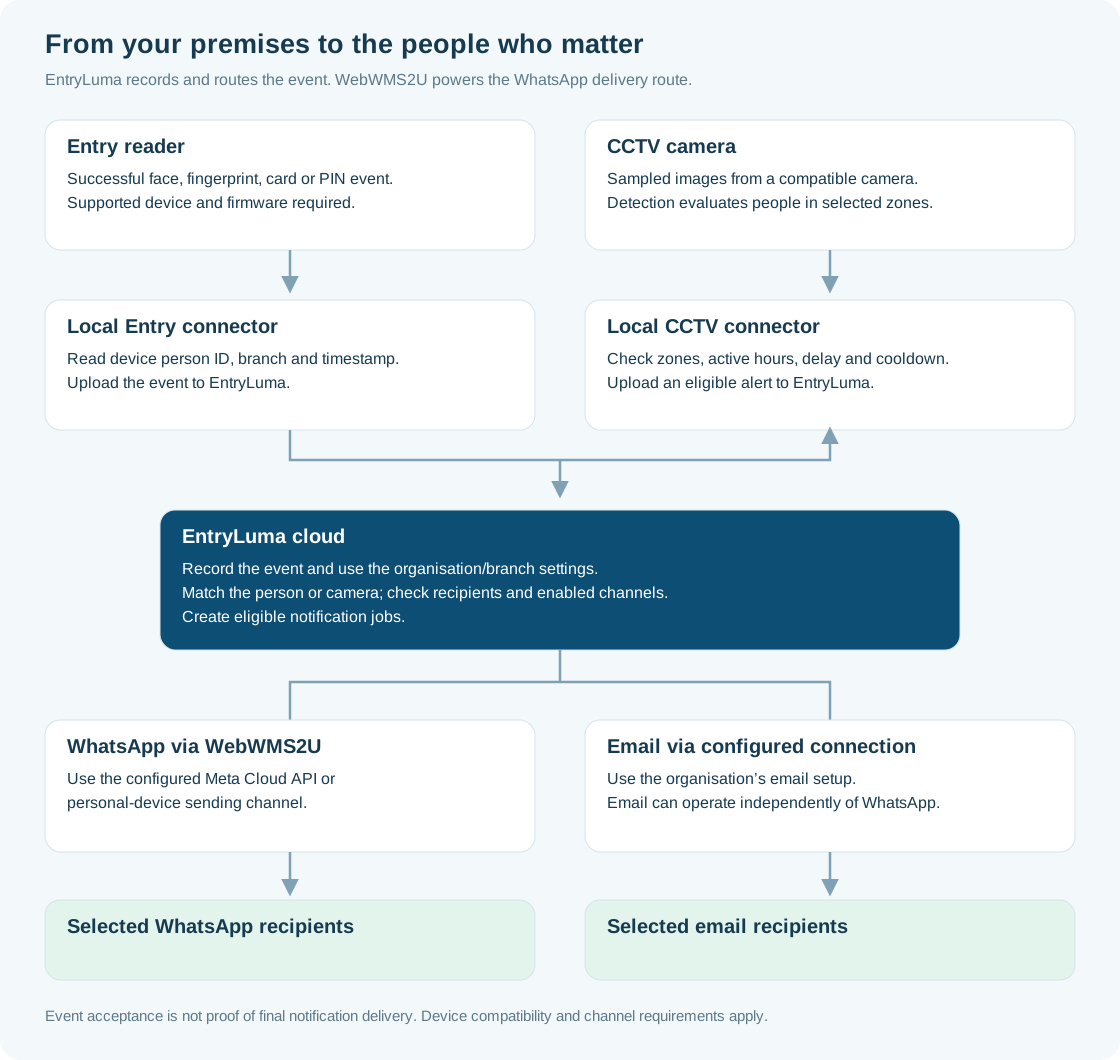
The event first reaches EntryLuma, where organisation, branch, person or camera, recipient and channel settings are applied. Eligible notification jobs then follow the configured delivery route.
- WhatsApp: jobs use the WebWMS2U delivery backend and the selected sending connection.
- Email: jobs use the configured email connection and can operate without WhatsApp.
The processing and connection flowchart shows both event paths and the delivery branches. You can also open the full vector flowchart.
Why an event record is not a delivery receipt
A reader scan may be captured but not match a configured person. An event may be recorded while its notification switch is off or no recipient is configured. A notification job may exist while the sending channel has a problem. Final delivery is another stage again.
Start at the equipment, check recent connector contact, locate the event and follow its notification status. This is more useful than repeatedly sending the same alert without finding where processing stopped.
What to prepare for a compatibility check
- Share the exact reader or camera model, and firmware where available.
- Describe the event: successful attendance scan, unattended counter, restricted-area presence or another supported rule.
- Confirm the local computer and network access available for the connector.
- Choose who should receive updates and whether you want WhatsApp, email or both.
- Test the full route with a real authorised event before rollout.
Keep software and messaging costs separate
EntryLuma software, devices, installation and WhatsApp messaging are different parts of the budget. For WhatsApp, select a suitable WebWMS2U plan and include additional usage or applicable Meta fees where needed. An email-only EntryLuma setup does not require a WebWMS2U subscription.
Compare EntryLuma service pricing with WebWMS2U messaging plans. Compatibility and the final setup should be confirmed before ordering equipment.
See the system before choosing a setup
Visit EntryLuma.com for the full product site. The entry-device demo and CCTV demo show the two different use cases. The WebWMS2U delivery explanation connects that product workflow to its WhatsApp route.
Which event should reach your phone?
Tell us your device or camera model and the update you want to receive. We will help assess the connection.
Discuss an EntryLuma Setup