Entry devices
Use confirmed access events from supported face, fingerprint, card or PIN readers. Map device person IDs to the people configured in EntryLuma.
Connected service · EntryLuma
Connect activity at your premises to the people who need to know, with EntryLuma event processing and WebWMS2U WhatsApp delivery.
EntryLuma service · WebWMS2U WhatsApp delivery · Compatibility checked per setup
 Connected service from XGEN Technologies Sdn Bhd
EntryLuma connects supported entry devices and compatible cameras to cloud event records and configured notifications. It is a separate attendance and CCTV service developed by XGEN Technologies Sdn Bhd. WebWMS2U provides its WhatsApp delivery backend.
A reader event can become a parent’s arrival update. A camera rule can become a manager’s unattended-counter alert. Your configuration decides which events and recipients are used.
Use confirmed access events from supported face, fingerprint, card or PIN readers. Map device person IDs to the people configured in EntryLuma.
Check whether people are present in selected camera areas. Configure occupied/empty conditions, active hours and delay before an alert.
Send the event to nominated contacts or branch recipients using WhatsApp, email or both, according to the enabled setup.
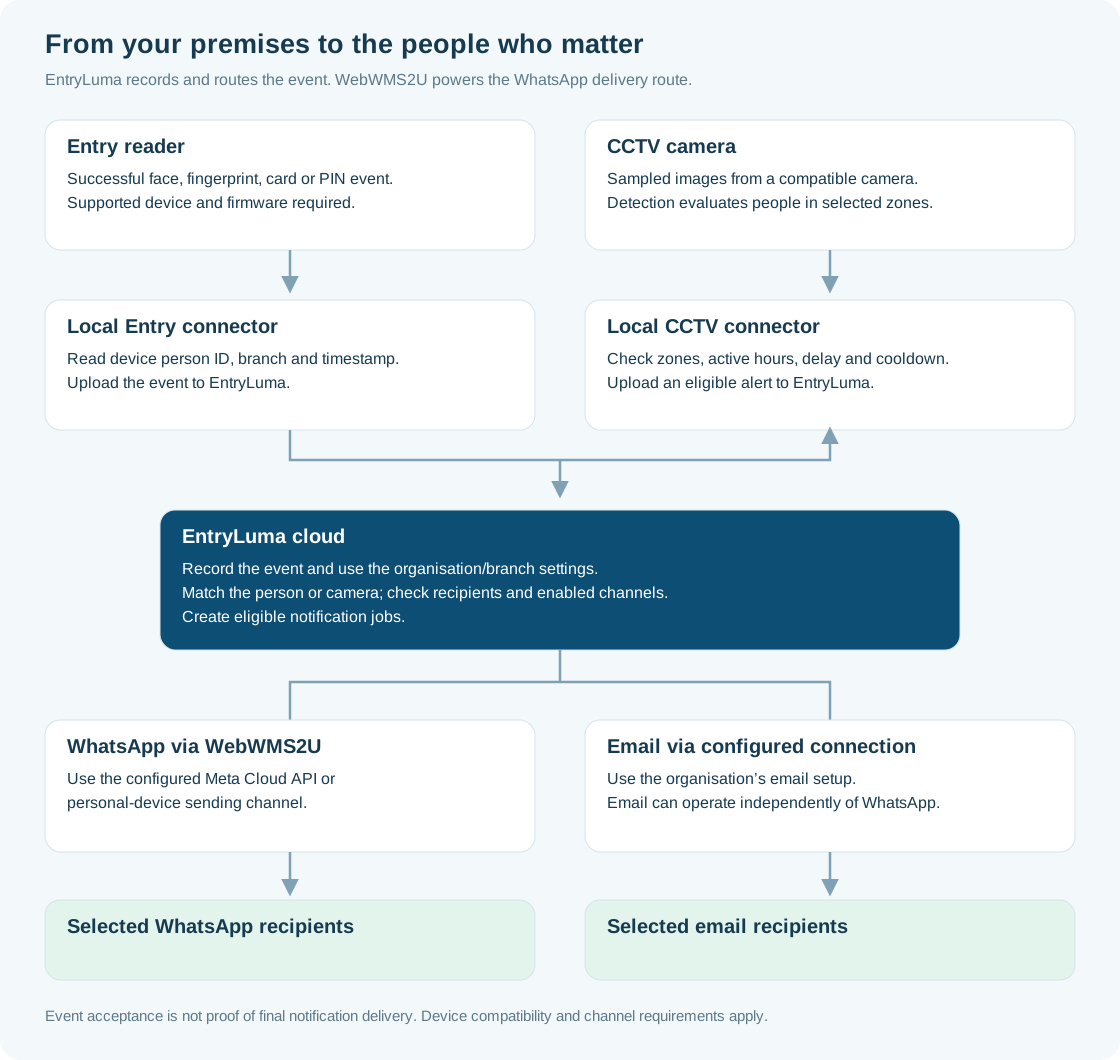
01 · AT YOUR PREMISES
Supported face, fingerprint, card or PIN reader records the access event.
A compatible camera provides the images used to check selected zones.
Pass the device person ID, location and timestamp to EntryLuma.
Check people in zones, active hours, delay and cooldown; submit an alert when due.
02 · ENTRYLUMA CLOUD
Use the organisation and branch settings, mapped person or camera, selected recipients and enabled channels to create eligible notification jobs.
03 · CONFIGURED DELIVERY
Process the WhatsApp job through the configured Meta Cloud API or personal-device channel.
Process the email job through the organisation’s email setup, independently of WhatsApp.
An event record and a delivered notification are different stages. The local connector needs the required device/network access; final delivery also depends on the selected channel and recipient.
Explore EntryLuma’s full website for product demonstrations, compatibility checks and service plans.
EntryLuma software, hardware, installation and WebWMS2U messaging costs are separate items. Check EntryLuma pricing and WebWMS2U plans before budgeting.
Share your reader or camera model, branch count and who should receive the notifications.