Unattended counter
Raise an alert when a customer area remains occupied while the staff counter stays empty for the configured delay.
CCTV integration · Camera zone notifications
Connect compatible cameras to EntryLuma zone rules and send the people who can respond a configured WhatsApp or email alert.
EntryLuma service · WebWMS2U WhatsApp delivery · Compatibility checked per setup
 Connected service from XGEN Technologies Sdn Bhd
EntryLuma CCTV checks people in selected camera areas and raises alerts when your configured conditions persist. WebWMS2U handles the WhatsApp delivery route so the team can receive an alert away from the camera monitor.
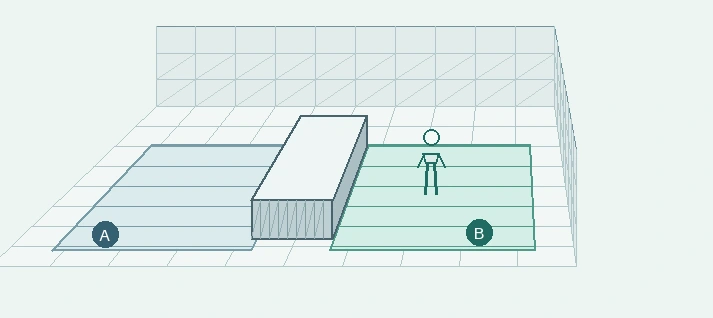
Raise an alert when a customer area remains occupied while the staff counter stays empty for the configured delay.
Notify the selected team when people are detected in a zone that should be empty during scheduled hours.
Check a marked area during closed hours and send an alert when its configured presence condition is met.
See the complete connection flowchart or explore EntryLuma’s CCTV demonstrations.
Camera support depends on the available image/stream interface and the connector version. The CCTV setup uses a compatible camera and local connector. The current rule setup supports one alert rule per camera and up to eight zones. Confirm the exact camera model and current connector capabilities before ordering.
Zones can represent customer and staff areas, but this does not identify who a person is or establish whether they are authorised. Lighting, angle, obstructions and sampling intervals affect detection. Staff should review the alert context.
Customer zone occupied + staff zone empty + conditions hold for 30 seconds during opening hours → notify the branch manager.
The delay is configurable. Decide who should receive the alert, how long to wait, and how to avoid repeated notifications while the same situation continues. Test the scene with a person before relying on it operationally.
No universal compatibility is assumed. Share the camera model, firmware and image-access details for assessment.
No. This CCTV workflow evaluates people present in marked areas. Mapped attendance uses supported entry-reader events.
Yes. Configured email delivery is independent of the WebWMS2U WhatsApp route.
No. It flags a configured condition for review; the recipient assesses what occurred.
Need reader-based attendance notifications? · Explore CCTV use cases
Share your reader or camera model, branch count and who should receive the notifications.